Typing the same hashtags into every post is tedious, and it’s how typos and forgotten tags creep in. A hashtag manager fixes that: save your best hashtags once as groups, then add the right set to any post in one click.
This guide explains how a hashtag manager works, how to build hashtag groups that actually help, and how to set them up in GoBrandIt, with real screenshots.
What is a hashtag manager?
A hashtag manager is a tool that stores your hashtags in named groups, such as “Festival”, “Product launch” or “Kathmandu food”. When you write a post, you open the manager and insert a whole group instead of typing each tag.
Benefits:
- Saves time on every post
- Keeps hashtags consistent across your team
- Prevents typos that make a hashtag useless
- Makes testing easier, because you know exactly which set you used
Why hashtag groups matter more in 2026
Instagram now allows a maximum of 5 hashtags per post, down from 30. With so few slots, every hashtag has to earn its place. Groups help you keep small, tested sets ready instead of dumping long lists. Read our full Instagram hashtag strategy for how to choose them.
How to create a hashtag group in GoBrandIt
- Open the composer and click the # icon in the editor toolbar. This opens the Hashtag Manager.
- Click New Hashtag Group.
- Give the group a clear name, such as “Festival” or “Café menu”.
- Add the hashtags in Content.
- Click Save.
How to insert saved hashtags into a post
Next time you write a post, click # in the editor and pick the group you need. Your saved hashtags drop into the caption, ready to edit.
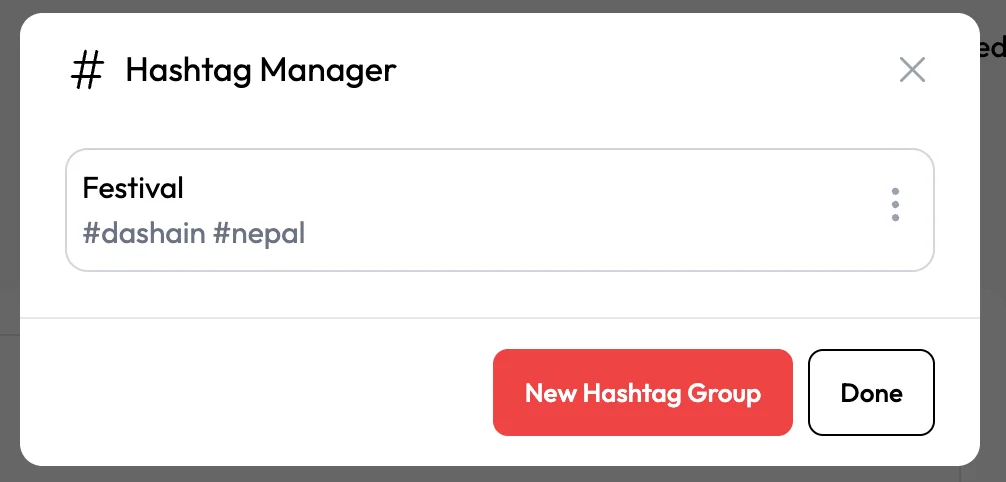
You can still add or remove individual tags after inserting a group, so each post stays relevant.
Hashtag group ideas by business type
| Business | Group name | Example hashtags |
|---|---|---|
| Café in Kathmandu | Café local | #kathmanducafe #kathmandufood #nepalicoffee |
| Clothing shop | New arrivals | #newarrivals #nepalifashion #kurtaset |
| Restaurant | Festival specials | #dashain #tihar #nepalifood |
| Travel company | Trekking | #nepaltrekking #everestbasecamp #annapurna |
| SaaS or agency | Marketing tips | #socialmediatips #smallbusinesstips #marketingtips |
Keep each group small, three to five tags, so it fits Instagram’s limit and stays focused.
Tips for better hashtag groups
- Mix sizes. Combine one broad tag with more specific niche and local tags.
- Go local. Location tags like #kathmandu or #pokhara help nearby customers find you.
- Add a branded tag. Use one unique tag for your brand or campaign.
- Match the post. Never use a group just because it’s saved. Remove tags that don’t fit.
- Review monthly. Swap out tags that bring no reach.
- Use platform-specific groups. LinkedIn needs few or no hashtags, TikTok works best with a handful of relevant tags, and Threads uses a single topic tag.
Hashtags by platform
| Platform | Suggested use |
|---|---|
| Up to 5 relevant hashtags | |
| TikTok | A few specific hashtags plus keywords in the caption |
| Zero to three hashtags | |
| Optional; one or two at most | |
| X | One or two |
| Threads | One topic tag per post |
When you post to several networks at once, tailor the hashtags for each version. See how to post to multiple social media platforms.
Hashtags for campaigns
Create a group for each campaign, including its branded tag. That way every post in the campaign uses the same tag, and you can follow the conversation around it. Our guide to social media campaign planning covers the rest of the process, and for festive seasons in Nepal see our Dashain and Tihar marketing ideas.
Frequently asked questions
What is a hashtag group?
A hashtag group is a saved set of hashtags with a name, such as “Festival”. You can insert the whole group into a post instead of typing each hashtag.
How many hashtags should I use on Instagram in 2026?
Instagram allows a maximum of 5 hashtags per post. Choose the most relevant ones rather than trying to reach the limit.
Can my team share hashtag groups?
Hashtag groups are saved in the Hashtag Manager, so everyone working in the workspace can use the same sets and keep posts consistent.
Do hashtags still work?
Yes, but they matter less than before. Clear captions, keywords and good content do most of the work. Hashtags help platforms understand your topic and help people browsing that tag find you.
Save once, post faster
Build a few small, tested hashtag groups, insert them in one click and review them monthly. Try GoBrandIt free to set up your first hashtag groups, and see how they fit into scheduling and publishing.